Load planning
Place boats and items on a trailer per leg, understand the fit, support, tipping and weight checks, and read the side and top-down diagrams.
Open a load plan
Every trailer on a trip has one load plan per leg. From the trip page, each trailer row links to the load plan of the first leg; the leg header has arrows to move to the next and previous legs. The URL is /webapp/loadplan/leg/{leg}.
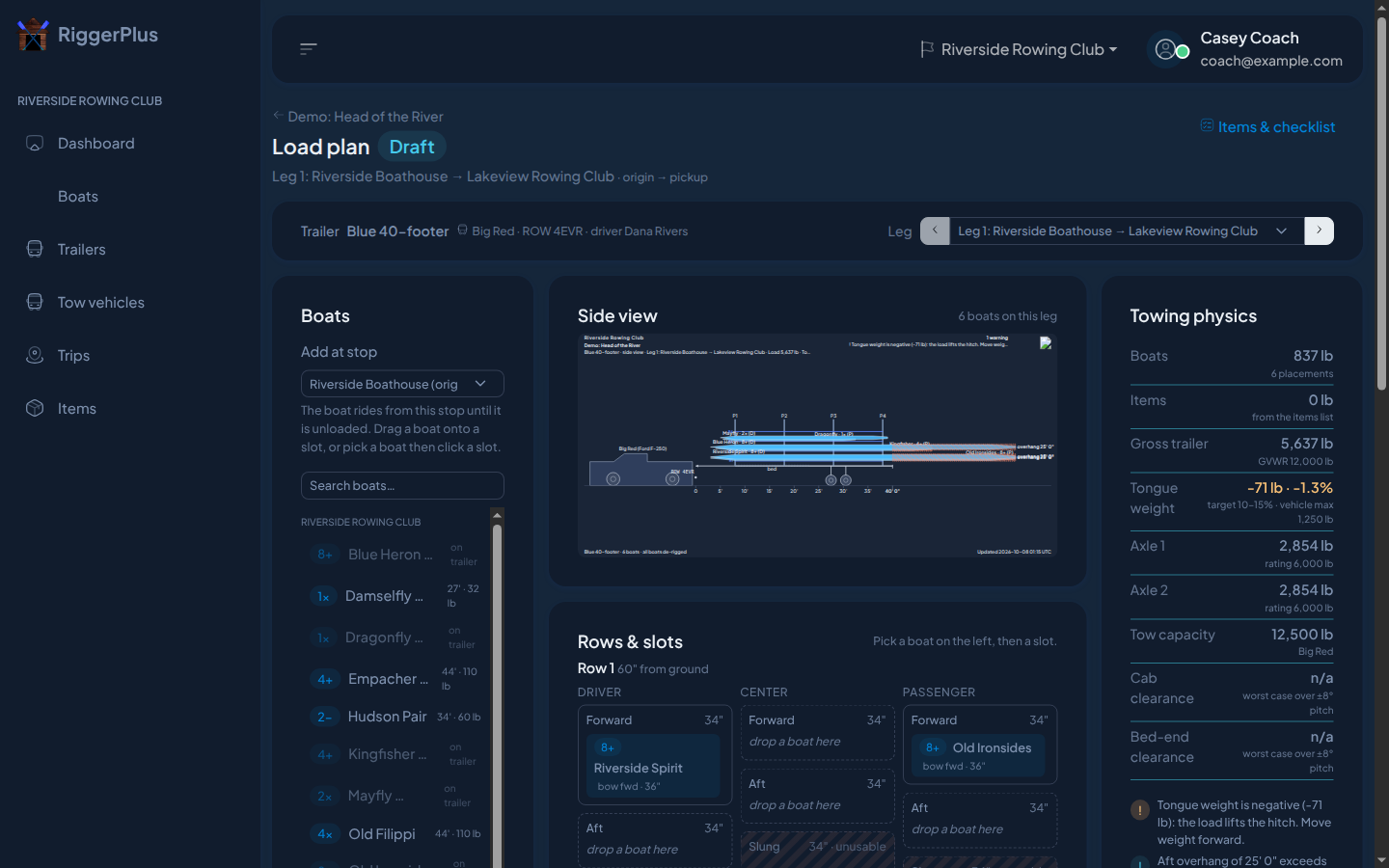
The page has four areas:
- Boats — every non-archived boat of your club (and any guest boats), with the ones already on this trailer marked. Boats of other clubs you are affiliated with are listed too for pickups.
- Rows & slots — the trailer as a grid: one row per rack height, driver / centre / passenger sides, forward and aft positions. Click a slot to place the selected boat; occupied slots show the boat and let you move or remove it.
- Side view — the live diagram (tow vehicle on the left, tongue at
0, posts and axles marked). Boats are drawn to scale, bow direction included. - Towing physics — totals and limits for this leg: trailer weight, tongue weight and percentage, tow-rating and GVWR usage, and the longest forward and aft overhangs.
Placing a boat
Select a boat, then a slot. RiggerPlus proposes the default offset (the forward end of the hull measured from the tongue) that rests the boat on two posts; adjust it or flip Forward / Aft bow direction and the diagram follows. Before saving, the dialog asks two things:
- Add at stop / Unload at — the cargo stop where the boat gets on and, optionally, where it comes off. The default is origin → end of trip.
- Where does the boat go on later legs? — if the same slot is taken on a later leg (another club's eight joins at a pickup, say), the dialog lists the conflicting legs with suggested free slots so you can choose a slot per leg right there.
The checker runs the fit rules for every leg the boat will ride, not just the one on screen, so a plan that works at the origin cannot silently break at a pickup three legs later.
Moving and scoping changes
Moving a placed boat asks for a scope: All legs changes the slot wherever the boat rides; This leg only records an override for the current leg and leaves the others alone. Overrides are shown with a marker in the slot grid. Remove at stop shortens the ride; Delete takes the boat off the trip entirely.
The checks
Each proposed placement is evaluated against the trailer, the vehicle and the other cargo on that leg. Hard errors block the save; warnings are saved but shown on the plan, the diagrams and the driver page.
| Check | What it looks at | Result |
|---|---|---|
| Slot usable | Slot exists on this trailer, is not marked unusable, and the hull does not sit over a blockage | error RP-602 / RP-611 |
| Overlap | Gunwale sections of boats in the same slot (forward and aft positions) may not overlap; a bow or stern deck may pass over a neighbour's post | error RP-603 |
| Support | The gunwale section must rest on at least two posts (slung rows are exempt). Resting only on a bow or stern deck is a warning, not an error | error RP-604 / warning |
| Tipping | Hull length against the spread of the posts it sits on — a long hull on two close posts is flagged | warning |
| Forward overhang | The forward end relative to the tow vehicle: anything above the cab line is checked against the cab height and the hitch length; a hull that would hit the cab is an error | warning / error |
| Aft overhang | Distance the hull extends past the bed, against the legal/your configured maximum | warning |
| Weights | Trailer GVWR, axle ratings, tow rating, tongue weight and tongue percentage (10–15 % is the comfortable band) | warning |
| Later legs | All of the above on every later leg the boat rides | RP-605 with per-leg suggestions |
Weights include items riding the same legs, so an oar box of eight sweeps on the bed shows up in the tongue percentage.
Diagrams
Two kinds of diagram are generated from the same plan:
- Side view — the whole rig: vehicle, trailer, every row with its boats, posts and axles, plus a legend with hull names and the physics summary. Available in light, dark, and a print theme (black-and-white, no fills) for the clipboard on the trailer.
- Top-down per row — one diagram per rack row, drawn as a US driver sees it standing behind the truck: passenger side at the top, driver side at the bottom, tongue to the left. Boats sharing a rack are drawn side by side; forward boats outboard, aft boats inboard.
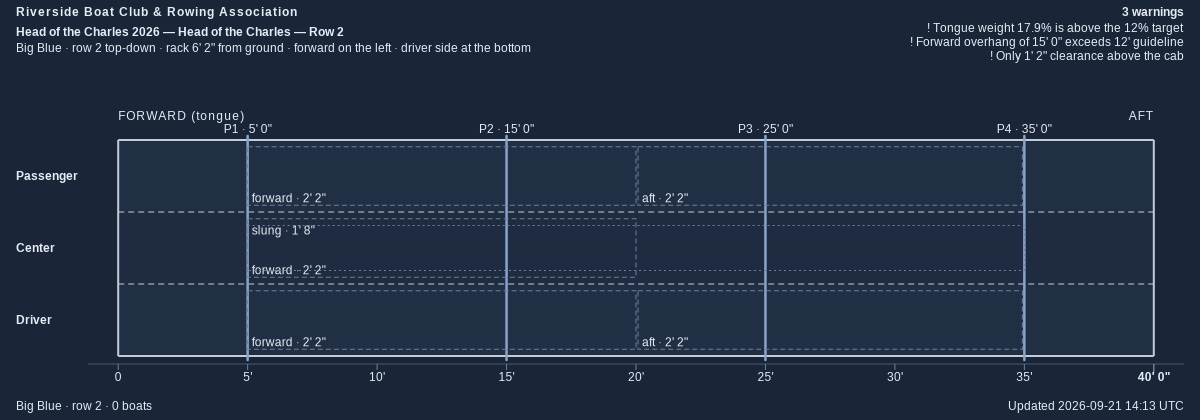
Diagrams are rendered on demand on the load-plan page and stored (versioned SVG and PNG) when you Render from the Share & diagrams page, so the public trip page and driver links keep working without a sign-in. See Trip day.
Items on the plan
Open Items & checklist for the same trailer and leg (/webapp/items/leg/…) to add oars, riggers, slings, coolers and one-off gear, each with a quantity, weight, the stop it is added at and optionally removed at, and a bed position. Items with a bed position are drawn on the trailer bed in the side view; bed warnings flag items hanging past the bed or stacked heavier than the bed section allows.